Yes, you can mine SHIB free on your phone - and no, it won't cost you a single dollar to start. The catch? SHIB isn't directly mineable. It never has been. But that hasn't stopped thousands of Android users from accumulating it passively using nothing but a phone, a charger, and a free terminal app. This guide breaks down exactly how to do it: three methods, one full step-by-step tutorial, and a frank assessment of what you can realistically earn.
⚡ Key Takeaways
- SHIB is an ERC-20 token on Ethereum - it was fully minted at launch, so direct mining is impossible
- The workaround: mine the RandomX algorithm via Termux + XMRig, get paid out in SHIB through unMineable
- Three legitimate methods exist: Termux + XMRig (most powerful), unMineable's Android app (easiest), and cloud mining (most risk)
- Typical phone hash rates run 100-500 H/s - earnings are small but real and passive
- The Google Play Store is packed with fake "SHIB mining" apps that collect ad revenue and never pay out; this guide shows exactly how to spot them
What Is SHIB Mining - and Why It Works Differently
SHIB isn't your typical mineable cryptocurrency. Launched in August 2020 by the pseudonymous "Ryoshi," Shiba Inu was built as an ERC-20 token on the Ethereum blockchain from day one. That single architectural choice changed everything about how it can be acquired.
Unlike Bitcoin - where miners compete to solve Proof of Work puzzles and earn freshly minted coins - SHIB was minted in its entirety at launch. All 1 quadrillion tokens existed from the start. Half went to a liquidity pool on Uniswap; the other half was sent to Vitalik Buterin, who burned 90% of his allocation. No new SHIB has been or ever will be created through computation.
Why SHIB Cannot Be Directly Mined
Bitcoin miners run the SHA-256 Proof of Work algorithm to unlock newly created coins. Monero miners run RandomX. Both protocols reward computation with freshly minted tokens. SHIB has no such protocol. Ethereum moved to Proof of Stake in September 2022, and even before that, SHIB operated as a token on Ethereum - not as the network's native asset. There's simply no block reward tied to SHIB. Your phone could mine forever and produce exactly zero SHIB through direct means. The workaround, though, is surprisingly elegant.
How Indirect Mining of SHIB Actually Works
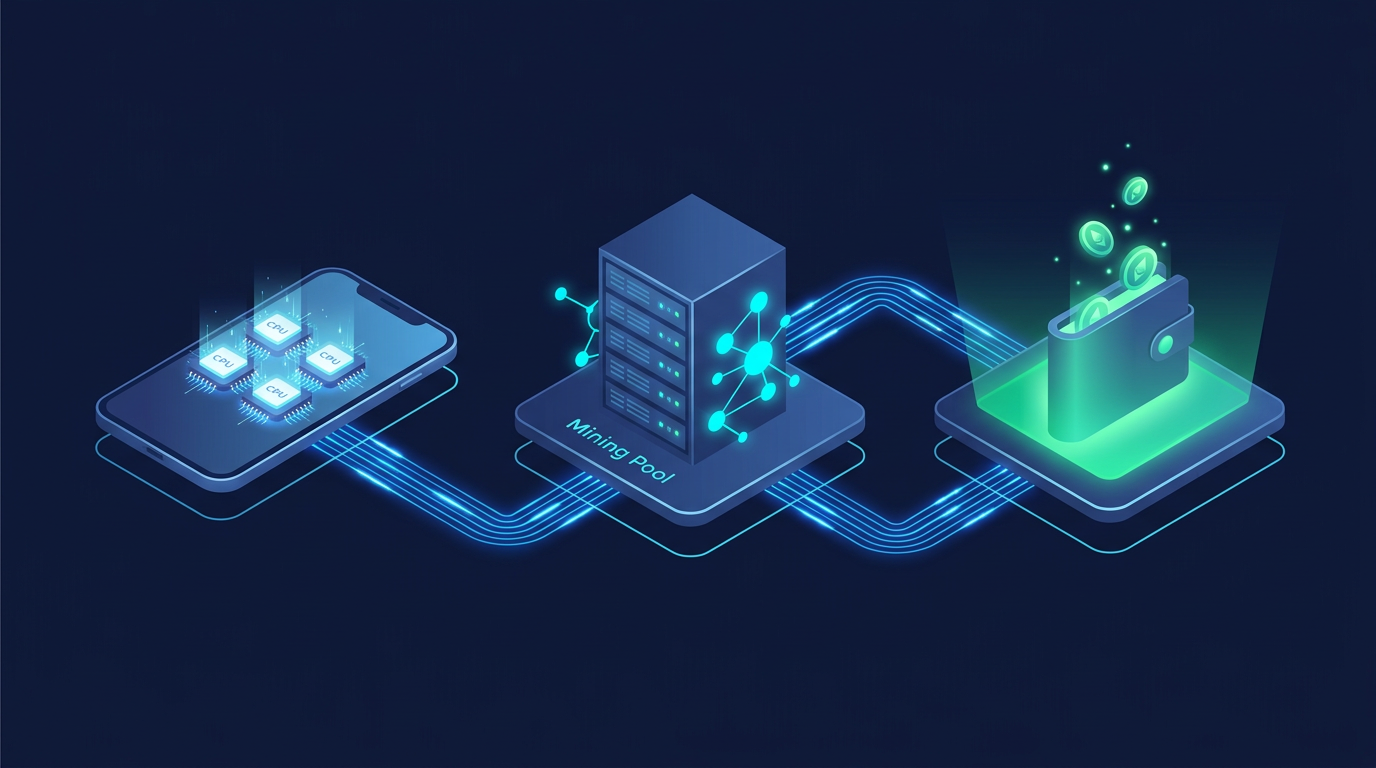
Here's the mechanism that makes this whole guide possible. Your phone mines the RandomX algorithm - the same algorithm used by Monero (XMR) - using its CPU. The software connecting everything is XMRig, an open-source CPU miner. You route your mining power through unMineable, a mining pool that accepts your hash rate, earns Monero rewards, automatically converts those rewards to SHIB at market rate, and deposits SHIB directly into your wallet.
Think of it like getting paid in dollars at work, then your employer automatically converts those dollars to yen before the deposit hits your account - except the conversion happens on-chain, transparently, at market rates.
HOW SHIB PHONE MINING WORKS
📱 Phone CPU
→
⚙ XMRig
→
🏊 unMineable Pool
→
🔄 Auto-converts to SHIB
→
💰 Your Wallet
Pool fee: 0.75-1% deducted automatically. No other costs for the free method.
unMineable charges a pool fee of 0.75-1% for this service, which covers the conversion mechanism. That's the only cost involved when using the free method. With the mechanics clear, here are your three realistic options for doing this on a phone.
3 Ways to Mine SHIB Free on Your Phone
Three paths exist for mining SHIB on mobile. They differ in setup complexity, control, and risk. Your best choice depends on technical comfort level and how much time you're willing to invest upfront.
At a glance:
- Termux + XMRig - most powerful, full control, requires command line comfort (~15 min setup)
- unMineable Android App - easiest, no command line, slightly less configuration control
- Cloud Mining - no local processing, but "free" is largely a myth; real cost and scam risk involved
Method 1 - Termux + XMRig on Android (Recommended)
Termux is a free Linux terminal emulator for Android, available on F-Droid (more on why F-Droid specifically in a moment). Inside Termux, you compile and run XMRig - the industry-standard open-source CPU miner used by serious miners worldwide. XMRig connects to unMineable's RandomX pool, mines, and your earnings arrive as SHIB.
This is the real deal. No subscription, no fake mining interface, no background ad revenue masquerading as earnings. Your phone's CPU is doing actual computational work contributing to the RandomX network, and unMineable's public dashboard verifies your hash rate contribution on-chain.
The limitation is honest: a mid-range smartphone CPU generates roughly 100-400 H/s on RandomX. A desktop Ryzen CPU generates 5,000-15,000 H/s. Phone mining is slow. Think of it as a passive accumulation strategy, not a primary income source.
The launch command, once everything is set up, looks like this:
The step-by-step tutorial for this method covers every command in sequence.
Method 2 - unMineable's Own Android Miner App
unMineable offers a native Android application that wraps all the XMRig configuration into a graphical interface. Download the APK from unmineable.com directly (not the Play Store - the Play Store listing may not always be current), enter your SHIB wallet address from MetaMask or Trust Wallet, select SHIB as the payout coin, and tap Start.
The app handles thread configuration internally, though you lose some granular control - you can't manually set thread count or memory tuning the way Termux lets you. Pool fees are identical to the Termux method. For anyone who sees the Termux command block above and immediately thinks "no thanks," this is the right starting point.
One practical note: the app needs background activity permissions to mine while the screen is off. Grant this in Android settings under Battery → Apps → unMineable → Unrestricted. Without it, mining pauses the moment you lock your phone.
Method 3 - Cloud Mining Services with SHIB Payouts
Cloud mining lets you rent hash power from a remote data center rather than running anything locally. Some services - certain NiceHash configurations among them - offer SHIB payout options. No battery drain, no compilation, no thermal management.
The "free" framing, though, needs scrutiny. Genuinely free cloud mining is rare. Most services require an initial deposit, and many operate on economics that make it difficult to turn a profit after fees are deducted. Before committing any funds to a cloud mining contract, verify three things:
- Withdrawal threshold and fee structure - many services have withdrawal minimums that take months to reach
- Company transparency - can you verify the operation's hash rate contribution externally?
- Community reviews over at least 12 months - short-term positive reviews are easy to manufacture
Treat cloud mining as the highest-effort, highest-risk option here - not the low-effort alternative it appears to be.
Phone Mining Methods: Side-by-Side Comparison
Ready to get started? Here's the step-by-step setup for the Termux method.
Step-by-Step: How to Start Mining SHIB Free on Android
The entire process - from zero to actively mining - takes about 15-20 minutes. Most of that is compile time while XMRig builds on your device; the actual configuration takes under 5 minutes once you know the commands.
Step 1 - Set Up Your SHIB Wallet (MetaMask or Trust Wallet)
Before touching Termux, you need an ERC-20 compatible wallet to receive your SHIB payouts.
MetaMask (mobile app + browser extension) and Trust Wallet (mobile-focused) are the two most practical options. Both are free, both support the ERC-20 token standard required for SHIB, and both are widely used in the DeFi ecosystem.
- Download MetaMask or Trust Wallet from the official app store
- Create a new wallet and follow the setup prompts
- Write down your seed phrase on paper and store it offline - this is the only way to recover your wallet if your phone is lost or reset
- Navigate to your wallet address (the long string starting with '0x...')
- Copy this address - you'll paste it into the XMRig launch command in Step 2
⚠ Security Reminder
- Never enter your seed phrase → into any website, app, or form that asks for it
- unMineable only needs your wallet address → not your seed phrase, private key, or password
- Minimum payout threshold → ~1,000,000 SHIB (takes 2-6 weeks of overnight mining)
MetaMask integrates more smoothly with DeFi protocols like ShibaSwap if you plan to stake your earnings later. Trust Wallet has a simpler mobile interface if you just want to hold.
Step 2 - Install Termux and Configure XMRig
Important: Download Termux from F-Droid (f-droid.org), not the Google Play Store. The Play Store version hasn't been updated in years and will cause package conflicts during the XMRig build.
Once Termux is installed, run these commands in sequence:
The HWLOC flag disables hardware location detection, which is necessary for Android compatibility. The final compile step builds XMRig from source - this typically takes 5-15 minutes depending on your processor.
Once compilation finishes, launch mining with:
⚠ Antivirus False Positive
Some antivirus apps flag XMRig as malware. This is expected - mining software triggers heuristic detection because it maxes CPU usage. Add Termux to your antivirus exclusion list if you encounter this. The XMRig source code is publicly audited at github.com/xmrig/xmrig.
To verify your hash rate is being received, go to unmineable.com, enter your wallet address in the search box, and confirm a non-zero hash rate appears in your stats. If it shows zero after 5 minutes of running, double-check the wallet address in your launch command.
How to Choose the Right Phone Mining Method for You
Which method fits your situation? Three quick questions narrow it down:
- Are you comfortable running command-line instructions? → Termux
- Do you want the simplest possible setup with zero terminal? → unMineable App
- Are you willing to invest small capital for better earnings potential? → Cloud Mining (with thorough due diligence)
Free vs Paid vs App-Based - Business Model Comparison
Understanding the business model behind each method helps you set the right expectations.
Free method profile: Best for someone who's a long-term SHIB believer, has an Android phone that charges overnight, and is happy accumulating slowly without any upfront risk. The on-chain verifiability of hash rate contributions via unMineable's dashboard means you can independently confirm every SHIB earned.
Paid/Cloud profile: Only makes sense if you expect significant SHIB price appreciation and are willing to absorb the real risk that the service charges more in fees than you earn in SHIB.
App-based profile: The right entry point for complete beginners. Graduate to Termux once you're comfortable with how the system works.
One of the biggest risks in the SHIB mining space, though, isn't low earnings - it's outright fraud.
SHIB Mining App Scams - What to Watch Out For
Before you download anything from the app store, there's a safety check that most guides skip entirely. The Google Play Store contains dozens of apps with names like "SHIB Miner Pro," "Shiba Inu Crypto Miner," and "Earn SHIB Daily" - none of which perform any actual mining whatsoever.
These apps generate revenue for their developers through in-app advertising. They simulate a mining interface with an incrementing SHIB counter, require you to "accumulate" a withdrawal threshold that conveniently resets or remains permanently out of reach, and collect ad revenue the entire time you're watching it. Your phone's CPU usage doesn't spike - because nothing computational is actually happening.
How to Identify Fake SHIB Mining Apps
⚠ Quick Legitimacy Check - Is This App Real?
✅ LEGITIMATE SIGNS
- CPU usage increases significantly when "mining" starts (verify in device settings → battery/task manager)
- Hash rate contribution appears on unMineable's public dashboard after entering your wallet address
- App downloaded directly from unmineable.com or verified open-source repository
❌ RED FLAGS
- App promises hundreds of thousands of SHIB per day with no visible CPU load
- Withdrawal threshold grows faster than your "earnings" or keeps resetting
- App asks for your wallet seed phrase or private key - legitimate mining only needs your public wallet address
- Developer has no verifiable identity, GitHub repository, or support channel
- Mining continues at the same "rate" whether plugged in or not, screen on or off
The definitive verification test: open unMineable's dashboard, enter your wallet address, and check whether a hash rate appears. Real mining shows up there because unMineable tracks every contributor to its pool. If your wallet shows zero hash rate while the app claims you're mining, the app is fake.
How to Maximize SHIB Earnings from Your Phone
Phone mining is modest by design. A flagship Android CPU (Snapdragon 8 Gen 3, Dimensity 9300) generates roughly 300-500 H/s on RandomX. A mid-range device hits 150-300 H/s. Budget phones may manage 80-150 H/s. For comparison, you can use a mining profit calculator to estimate earnings based on your specific hardware.
The strategy for phone miners isn't raw earning power - it's passive accumulation compounded by smart positioning of those earnings.
Popular SHIB Accumulation Strategies for Phone Miners
Once SHIB lands in your wallet, four strategies determine what you do with it. Each has a different risk profile and compatibility with phone mining's low-volume output.
HODL pairs naturally with phone mining because both require minimal active management. Mine overnight, accumulate SHIB, hold for a longer-term price thesis. No gas fees, no transactions, no active decisions beyond the initial setup.
Staking on ShibaSwap is the most actionable next step once your mining balance accumulates. Connect MetaMask to ShibaSwap (shibswap.com), navigate to the "Bury" section, and stake your SHIB to earn BONE token rewards. BONE is the governance token of the Shiba Inu ecosystem, and its yield comes from actual platform activity - not inflationary emissions.
DCA conversion means periodically using your mined SHIB to buy additional SHIB on dips through an exchange. It amplifies exposure but adds active decision-making and transaction costs.
Yield farming - providing SHIB liquidity to pools on ShibaSwap or Uniswap - generates LP fee rewards, but at phone mining's earning rate, the SHIB amounts involved are typically too small to justify the gas fees and impermanent loss risk until substantial holdings have built up.
These are strategies, not financial advice. Evaluate each based on your personal risk tolerance and do your own research before committing funds.
Thread Count, Battery, and Cooling Optimization
Four settings have a direct impact on how much SHIB you earn and how long your hardware lasts:
📊 4 Quick Optimization Tips
- Thread count: Start at 75% of your core count (quad-core = 3 threads). Bump to max only during overnight charging if thermals allow
- Mining intensity: Set to Medium during active phone use, Max when plugged in overnight and the phone sits idle
- Always mine plugged in: Mining drains battery at 80-120% of typical charge rate. Sustained mining on battery shortens cell longevity
- Verify contribution: Check unMineable dashboard after every session change - misconfigured pools are a common silent failure mode
Converting and Growing Your Mined SHIB Rewards
WHAT TO DO WITH YOUR MINED SHIB
Option 1
HOLD in Wallet (MetaMask / Trust Wallet) - Zero gas fees, full self-custody. Best for long-term price thesis.
Option 2
STAKE on ShibaSwap - Connect MetaMask → Bury SHIB → Earn BONE rewards from real platform activity.
Option 3
TRADE on Exchange (Binance, Coinbase, etc.) - Transfer SHIB → Execute trade → Hold or convert. Check gas fees first.
⚠ Gas Fee Warning
Ethereum gas fees can run $2-8 depending on network congestion. Wait until you've accumulated 2-5 million SHIB before withdrawing to make the math worthwhile.
Alternatives to Mining SHIB Free on Your Phone
Phone mining works, but it's slow. If the pace doesn't suit you - or you want to complement it - four alternatives can build a SHIB position without a GPU rig:
- Staking on ShibaSwap (Easy) - stake existing SHIB to earn BONE token yield from real platform activity. Zero mining required; works from MetaMask on mobile
- Crypto faucets (Easy) - micro-earning platforms that dispense small SHIB amounts for completing tasks or captchas. Earnings are negligible, but genuinely free with no setup
- Exchange earn programs (Easy-Medium) - platforms like Binance periodically run structured staking products with SHIB rewards. Availability depends on current platform offerings
- Shib Army community rewards and airdrops (Low effort, unpredictable) - the Shib Army community on Twitter and Telegram occasionally coordinates airdrop campaigns tied to ecosystem milestones
None of these produce significant earnings quickly. Phone mining isn't fast either. The compounding value comes from combining methods: mine passively overnight, stake what accumulates, stay engaged with community opportunities.
Conclusion - Is Mining SHIB Free on Your Phone Worth It?
The honest answer depends on who you are.
If you're a patient SHIB accumulator: yes, without question. The Termux + unMineable setup is genuinely free, carries no financial risk, runs passively overnight, and produces verifiable, on-chain earnings you can track in real time. You're not trusting a third party with your funds at any point - your wallet stays under your control throughout.
If you're looking for meaningful income: be realistic. Phone hash rates make significant short-term earnings impractical. A dedicated GPU mining rig, or more direct participation in on-chain yield-generating protocols, will serve that goal far better.
If you're an absolute beginner: start with the unMineable Android app. Skip Termux for now, get familiar with the mechanism, verify your first earnings hit your wallet, then consider the Termux upgrade for better control.
If you have an Android phone and access to a charger, there's nothing stopping you from starting tonight. The on-chain, self-custodial nature of the whole setup - your wallet, your keys, your SHIB - is exactly how DeFi is supposed to work. Platforms like Zipmex are built on the same principle: real yield from verifiable on-chain activity, no custodial intermediaries. Whether you're accumulating SHIB through mining or exploring the broader DeFi ecosystem, the trend is consistent - transparent, trustless systems are winning over opaque ones.
Crypto-related activities, including mining and staking, carry substantial risk. Token values fluctuate significantly, and earnings from phone mining are not guaranteed. Nothing in this guide constitutes financial advice. Always conduct your own research before making financial decisions.
Last updated: March 2026.
Frequently Asked Questions
Can you really mine SHIB for free on your phone?
Yes - with the right setup. Since SHIB can't be mined directly, the free method involves using your phone's CPU to mine the RandomX algorithm via XMRig and Termux, then receiving SHIB as payout through the unMineable pool. The only "cost" is electricity (negligible when plugged in) and the 0.75-1% pool fee deducted automatically from earnings. No upfront investment, no subscription required - your hash rate contribution is independently verifiable on unMineable's public dashboard, making this one of the most transparent ways to accumulate SHIB for free on Android.
Is SHIB directly mineable like Bitcoin?
No. Bitcoin uses a Proof of Work protocol where miners earn newly minted BTC by solving computational puzzles. SHIB is an ERC-20 token on the Ethereum blockchain - all 1 quadrillion SHIB tokens were minted at launch in August 2020. Ethereum itself runs on Proof of Stake, which doesn't involve CPU/GPU mining at all. There is no hardware, software, or algorithm that can produce new SHIB through direct mining. Any service claiming to mine SHIB free on your phone directly is either misrepresenting how the process works or running a fraudulent operation.
What is unMineable and how does it work?
unMineable is a mining pool that bridges the gap between mineable cryptocurrencies and non-mineable tokens like SHIB. When you connect XMRig to their pool, your hardware mines the RandomX algorithm. unMineable collects your hash rate, earns Monero block rewards from the network, converts those rewards to SHIB at market rate, and deposits the converted amount to your wallet. The pool fee for this service is 0.75-1%. Your stats - including hash rate, pending balance, and payout history - are publicly visible by entering your wallet address on their site, making the entire process fully verifiable on-chain.
Are SHIB mining apps on the Google Play Store legitimate?
The vast majority are not. Legitimate SHIB mining on mobile requires actual CPU computation - XMRig running via Termux or unMineable's official app downloaded from their website. Apps on the Play Store claiming to "mine SHIB" without any CPU load or without connecting to a verifiable pool are not performing real mining. They typically monetize through advertising while simulating a mining interface. The verification test is simple: start "mining," then check unMineable's public dashboard with your wallet address. If your hash rate doesn't appear there, the app is fake.
How much SHIB can you earn per day mining on a phone?
Earnings depend on your device's CPU performance and current network difficulty. Budget phones (80-150 H/s) produce roughly 3,000-6,000 SHIB per day; mid-range devices (150-300 H/s) generate 6,000-12,000 SHIB daily; flagship phones (300-500 H/s) can reach 12,000-20,000 SHIB per day. At current SHIB pricing, this translates to fractions of a cent to a few cents daily. The value proposition isn't short-term income - it's passive accumulation in a token with historically high price volatility. Always use a mining profitability calculator to verify current estimates before committing your device.
Can I mine SHIB while my phone is locked or sleeping?
Yes, but you need to configure Android's battery optimization settings to allow it. By default, Android restricts background CPU usage when the screen is off. To keep Termux or the unMineable app running, go to Settings → Battery → App Battery Management, find your mining app, and set it to "Unrestricted." Also disable "Adaptive battery" for the app. Without these changes, mining typically pauses within 30-60 seconds of the screen locking, which defeats the entire purpose of overnight SHIB accumulation.
What should I do with my earned SHIB once it reaches the withdrawal threshold?
When unMineable's 1,000,000 SHIB threshold is met, SHIB transfers automatically to your wallet address. Three paths make sense: hold in your wallet for zero gas fees and full self-custody; stake on ShibaSwap by connecting MetaMask to the "Bury" feature to earn BONE token rewards from real platform activity; or transfer to a centralized exchange like Binance for liquidity. One practical consideration: check current Ethereum gas fees before moving SHIB - at low SHIB prices, gas can eat a meaningful portion of small withdrawals. Waiting until 2-5 million SHIB has accumulated typically makes the economics more favorable.