Over 60 million people worldwide have downloaded the Pi Network app to mine cryptocurrency directly from their smartphones. Whether you use Android or iOS, setting up the Pi mining app takes under five minutes and costs absolutely nothing.
⚡ Quick Answer
To download the Pi Network app, search "Pi Network" in the Google Play Store (Android) or Apple App Store (iOS). The app is developed by SocialChain, is completely free, and requires an invitation code from an existing user to create your account. Once installed, you tap a single button every 24 hours to mine PI - no battery drain or special hardware needed.
In this guide, you will learn exactly how to download Pi Network on both Android and iOS, complete the pi app setup from scratch, get a working pi invitation code, and start mining your first PI coins within minutes.

What Is Pi Network? A Quick Overview Before You Download
Before you start the pi network app download, here is what you need to know. Pi Network is a mobile-first cryptocurrency project launched in March 2019 by Stanford University PhD graduates Dr. Nicolas Kokkalis and Dr. Chengdiao Fan. Unlike traditional cryptocurrency mining that requires expensive hardware and massive electricity consumption, Pi lets anyone with a smartphone mine digital currency by simply tapping a button once per day.
The project operates on the Stellar Consensus Protocol (SCP), a trust-based system where users form "Security Circles" to vouch for each other's identity. This means mining Pi consumes virtually no battery power and does not affect your phone's performance.
As of February 2026, Pi Network has crossed some significant milestones. The PI coin trades at approximately $0.185 with a market cap near $1.67 billion. More than 16 million users have completed KYC verification and migrated tokens to the mainnet, which launched on February 20, 2025. The maximum supply is capped at 100 billion tokens, with 9 billion currently in circulation.
If you want a deeper understanding of the project before getting started, check out our full guide on what is Pi Network.
🔢 PI Network Quick Stats
Current Price
~$0.185
Market Cap
~$1.67B
All-Time High
$2.99
Max Supply
100 Billion PI

How to Download Pi Network on Android and iOS
The pi network app download process differs slightly between platforms. Here is exactly what to do on each device.
Pi App Android Download
Open the Google Play Store
Launch the Play Store on your Android device. Make sure your device runs Android 7.0 or higher - most phones from 2017 onward are compatible.
Search for "Pi Network"
Type "Pi Network" in the search bar. Look for the app by SocialChain - it has a yellow Pi symbol icon. The app has over 100 million downloads and is about 56 MB in size.
Tap "Install"
Hit the green Install button. The download should take under a minute on a standard connection. Once installed, tap "Open" to launch the app.
The latest Android version is 1.43.0, updated January 28, 2026. The app is free and rated "Everyone" in terms of content.
Pi App iOS Download
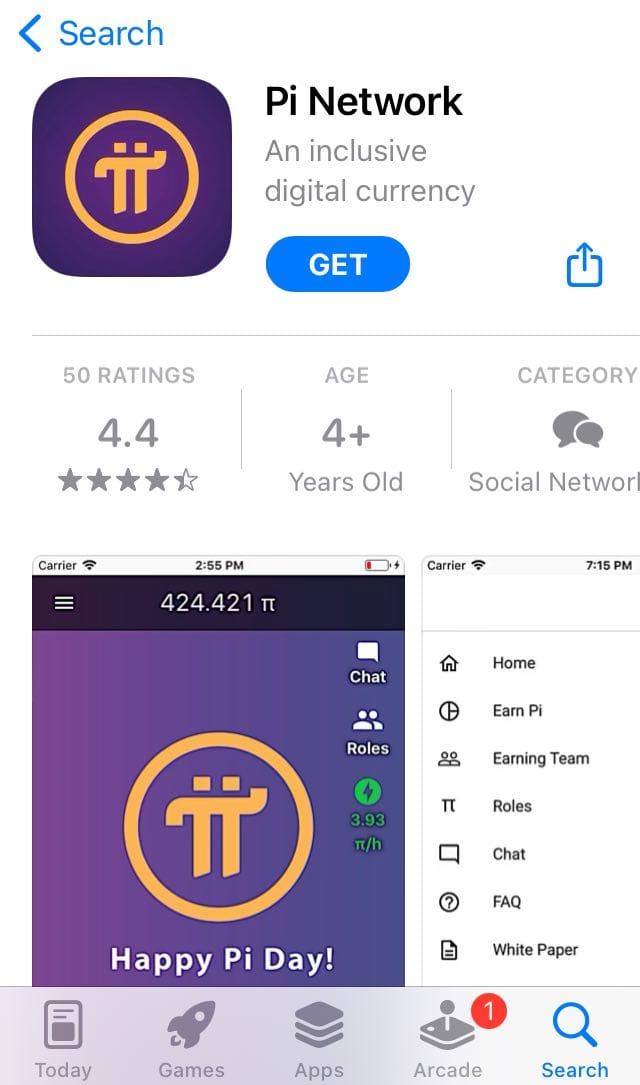
Open the Apple App Store
Launch the App Store on your iPhone or iPad. You need iOS 13 or later to install the Pi Network app.
Search for "Pi Network"
Search "Pi Network" and find the app published by SocialChain. Verify the developer name to avoid fake or copycat apps.
Tap "Get" and Confirm
Tap the "Get" button. You may need to authenticate with Face ID, Touch ID, or your Apple ID password. The app is free - no in-app purchases are required to mine.
You can also access the Pi Network directly via their website at minepi.com for additional resources and developer tools.
⚠ Safety Warning
Only download Pi Network from the official Google Play Store or Apple App Store. The developer must be listed as SocialChain. Avoid downloading APK files from third-party websites, as they may contain malware or steal your account credentials.

Pi App Setup: Creating Your Account Step by Step
After downloading the app, the pi app setup process is straightforward. Here is how to complete your pi network sign up and start mining.
Choose Your Sign-Up Method
When you first open the Pi Network app, you will see two options for creating your account: sign up with a phone number, or sign up with Facebook. Using your phone number is recommended because it simplifies the KYC verification process later. Pick your country code, enter your number, and you will receive an SMS verification code.
Enter a Pi Invitation Code
Pi Network is a referral-only platform. You cannot create an account without a valid pi invitation code from an existing user. When the app prompts you, enter a pi referral code to activate your account. This referral system serves two purposes: it connects you to an existing network member (which boosts both users' mining rates) and it helps Pi verify that real humans - not bots - are joining the network.
Set Your Real Name and Username
Enter your real first and last name. This matters because your name must match your government-issued ID when you complete KYC verification later. Choose a unique username - this also becomes your personal referral code that you can share with others.
Verify Your Identity
Complete the phone number or Facebook verification to confirm your account. You will receive a code via SMS - enter it within the time limit to proceed.
Your Dashboard Is Ready
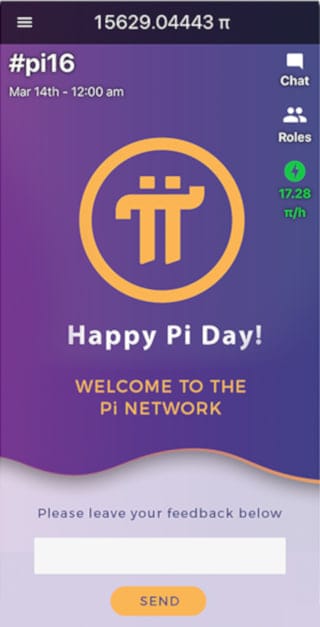
Once verified, you land on the main Pi app dashboard. Here you can see your Pi balance (starting at zero), the mining button, and navigation to features like the Pi wallet, Pi Browser, and community chat.
How to Start Mining Pi: Your First Session
Now that your account is set up, it is time to learn how to start mining pi. The process could not be simpler.
Tap the lightning bolt icon on your home screen. That is it. Mining begins immediately and runs for 24 hours. You do not need to keep the app open - the session runs in the background without draining your battery or using significant data. After 24 hours, you will receive a notification reminding you to tap again to start a new session.
The current base mining rate is approximately 0.1 Pi per 24-hour session, though this rate increases when you invite new members, build your Security Circle, and contribute to the network. The declining issuance model means earlier miners accumulate more PI over time, creating an incentive to start as soon as possible.
🎯 Key Takeaways - Mining Basics
- Tap the mine button once every 24 hours - takes literally 3 seconds
- Mining does not drain battery or require the app to stay open
- Base rate is ~0.1 Pi/day - boosted by referrals and Security Circles
- The earlier you start, the more Pi you accumulate before rates decline further
Understanding how cryptocurrency mining works at a fundamental level can help you appreciate what makes Pi's mobile mining approach unique compared to traditional methods.
Pi Invitation Code: How It Works and Why You Need One
The pi invitation code system is central to how Pi Network grows. Every user receives a unique referral code (their username) once they create an account. New users must enter a valid code during sign-up to join the network.
How Pi Referral Codes Work
When someone uses your pi referral code to join, several things happen. First, the new user gets a 25% mining rate boost. Second, you earn additional PI through the referral bonus whenever your referred user mines. Third, both users can add each other to their Security Circles, which further increases mining rates for the entire group.
This is not a one-time bonus. As long as your referred members continue mining daily, you continue earning the referral multiplier. This is why active ambassadors who bring in consistent miners can accumulate significantly more PI than solo miners.
Where to Find an Invitation Code
If you do not know anyone currently mining Pi, you have a few options. You can search crypto communities on platforms like Reddit (r/PiNetwork) or Twitter/X for shared codes. Many Pi users publicly share their referral codes in community threads. You can also check Pi-focused Discord servers or Telegram groups.
Boost Your Mining Rate: Security Circles and Referrals
After the initial pi app setup, there are two main ways to increase how much Pi you earn daily.
Building Your Security Circle
The Security Circle is Pi Network's trust mechanism. You can add 3 to 5 people you trust personally - family members, close friends, colleagues. When your Security Circle is full and all members mine daily, your mining rate increases significantly. This is how Pi replaces energy-intensive cryptographic puzzles with human trust networks.
Growing Your Referral Network
Every person you invite using your referral code becomes part of your "Earning Team." The more people in your team who mine daily, the higher your mining rate. This makes Pi Network a genuinely social experience - the more connected you are, the more you earn. If you are interested in learning how these community-driven models compare to traditional mining approaches, our guide on what is Bitcoin mining provides useful context.

What Happens After You Download: KYC, Wallet, and Mainnet Migration
Downloading the pi mining app and tapping the mine button daily is just the beginning. To actually own and use your mined PI coins, you need to complete several additional steps.
Complete KYC Verification
Pi Network requires Know Your Customer (KYC) verification before you can migrate your mined coins to the mainnet blockchain. The process involves submitting a government-issued ID and a selfie. As of February 2026, over 16 million users have successfully completed KYC and migrated their tokens. The KYC process is handled within the Pi app itself - you do not need to use external services.
Set Up Your Pi Wallet
After KYC approval, navigate to the Pi wallet section in the app. You will generate a 24-word passphrase - this is your recovery key. Write it down on paper and store it somewhere safe. Do not screenshot it, do not store it digitally, and never share it with anyone. Losing this passphrase means losing access to your PI permanently.
Migrate to Mainnet
Once your wallet is created and KYC is approved, you can migrate your mined Pi tokens from the app balance to the mainnet blockchain. After migration, your PI is real cryptocurrency that can be transferred, traded on exchanges, or used within the Pi ecosystem.
If you eventually want to convert your mined PI into cash, our step-by-step guide on how to sell Pi coin covers the complete process including exchange selection and withdrawal methods.
⚠ Risk Warning
Pi Network has faced criticism regarding centralization, ad-heavy monetization within the app, and the massive maximum supply of 100 billion tokens. The PI price has dropped over 93% from its all-time high of $2.99 in February 2025. While mining is free, the time investment and personal data shared through KYC are real costs. Always do your own research before investing time or money into any cryptocurrency project.
Common Pi Network App Download Issues and Fixes
Sometimes the pi network app download does not go smoothly. Here are the most frequently reported problems and their solutions.
"App not available in your region" - Pi Network is available in most countries, but some regions may have restrictions. Try using the direct links from the official Pi Network website to access the correct store listing.
"Invitation code not working" - Double-check the code for typos. The code is case-sensitive and must belong to an active Pi user. Try a different code if the problem persists.
"Error creating wallet" - This is a known issue reported by multiple users. Clear the app cache, restart your phone, and try again. If the error continues for more than a few days, contact Pi Network support through the in-app chat.
"Mining session not starting" - Ensure your app is updated to the latest version (1.43.0 as of February 2026). Go to the Play Store or App Store and check for updates. An outdated app may have compatibility issues with the current network protocol.
Is Pi Network Worth Downloading in 2026?
The honest answer depends on your expectations. Here is a balanced assessment.
📈 Reasons to Download
- Zero financial risk: Mining is completely free with no hardware or electricity costs
- Minimal time investment: One tap per day takes under 5 seconds
- Real tradable asset: PI is listed on multiple exchanges with a $1.67B market cap
- Growing ecosystem: Developer SDK, Pi Browser, and dApps expanding in 2026
📉 Reasons for Caution
- Massive token supply: 100 billion max supply creates enormous dilution pressure
- Price depreciation: Down 93% from ATH, currently around $0.185
- Centralization concerns: Mainnet validators still primarily run by the Core Team
- Ad-heavy experience: The app generates revenue through in-app advertisements
The bottom line: since mining is free and takes seconds per day, there is very little downside to trying Pi Network. Just do not invest money you cannot afford to lose if you decide to buy PI on exchanges, and treat any mined coins as a speculative bonus rather than a reliable income stream. Understanding the basics of how cryptocurrency networks function will help you evaluate Pi's long-term potential more critically.
Frequently Asked Questions
Is the Pi Network app free to download?
Yes. The Pi Network app is completely free on both the Google Play Store and Apple App Store. There are no hidden fees, in-app purchases, or subscription costs required to mine Pi. The only requirement is an invitation code from an existing user to create your account.
Do I need an invitation code to join Pi Network?
Yes. Pi Network uses a referral-based sign-up system. You must enter a valid invitation code (also called a referral code) from an existing Pi user during registration. This system helps the network verify real users and prevents bot accounts. You can find codes from friends, family, or online crypto communities.
Does Pi Network mining drain my phone battery?
No. Unlike traditional cryptocurrency mining, Pi Network uses the Stellar Consensus Protocol which does not require intensive computation. The app runs in the background with negligible battery and data usage. You only need to open the app once every 24 hours to tap the mining button and start a new session.
Can I download Pi Network on PC?
There is no official Pi Network desktop app. However, you can run the Android version on your PC using emulators like BlueStacks. Pi also offers a web interface at node.minepi.com for node operators and developers. For standard mining, the mobile app remains the primary tool.
How much Pi can I mine per day?
The base mining rate is approximately 0.1 Pi per 24-hour session for a solo miner. This rate increases when you build your Security Circle (up to 5 trusted contacts) and invite new users through your referral code. Active miners with full Security Circles and large referral networks can earn several times the base rate.
Is Pi Network a scam?
Pi Network has identifiable founders with verifiable Stanford University credentials, a functioning blockchain, and tokens trading on legitimate exchanges. However, it has drawn criticism for its ad-heavy app, MLM-like referral system, centralized control, and slow ecosystem development. Since mining is free, the main risk is time investment and personal data shared through KYC - not financial loss from mining itself.
When can I sell my mined Pi?
You can sell PI after completing three steps: KYC verification within the Pi app, wallet creation with your 24-word passphrase, and mainnet migration of your mined tokens. Once migrated, you can transfer PI to supported exchanges like OKX, MEXC, or Gate.io and sell for USDT or other cryptocurrencies.
Conclusion
The pi network app download process is quick, free, and accessible to anyone with a smartphone. Whether you are on Android or iOS, getting started takes under five minutes: download from your official app store, enter an invitation code, verify your phone number, and tap the mining button.
While Pi Network remains a speculative project with real concerns about tokenomics and centralization, the zero-cost entry point makes it an easy experiment for anyone curious about cryptocurrency. Start mining today, complete your KYC when prompted, set up your wallet carefully, and you will be positioned to use or trade your PI as the ecosystem develops throughout 2026 and beyond.
Ready to Explore More Crypto Opportunities?
Discover, trade, and invest in digital assets with Zipmex - your trusted crypto platform.
Start Trading Now →⚠ Disclaimer: The information provided in this article is not intended to provide investment or financial advice. Investment decisions should be based on the individual's financial needs, objectives, and risk profile. We encourage readers to understand the assets and risks before making any investment entirely. Cryptocurrency investments are subject to high market risk. Past performance does not guarantee future results.