Sent a Bitcoin transaction and it's just sitting there - not confirmed, not failed, just pending? You're not alone. Every day, thousands of people ask the same question: how long does it take to transfer Bitcoin?
⚡ Quick Answer
A Bitcoin transfer takes 10 minutes to 1 hour under normal conditions. Your first confirmation arrives in ~10 minutes; most exchanges require 3-6 confirmations (30-60 minutes) before crediting your balance. The two factors you can actually control are your transaction fee and the time you choose to send.
Bitcoin doesn't work like a bank wire. When you hit "send," your transaction enters a global queue, competes with thousands of others for a spot in the next block, and waits for miners to verify it. Understanding this process means you'll never be surprised by a delayed transfer again.
In this guide we cover exactly how Bitcoin confirmation times work in 2026, what slows transactions down, and the practical steps you can take to speed things up - or at least predict when your funds will arrive.
How Bitcoin Transfers Actually Work
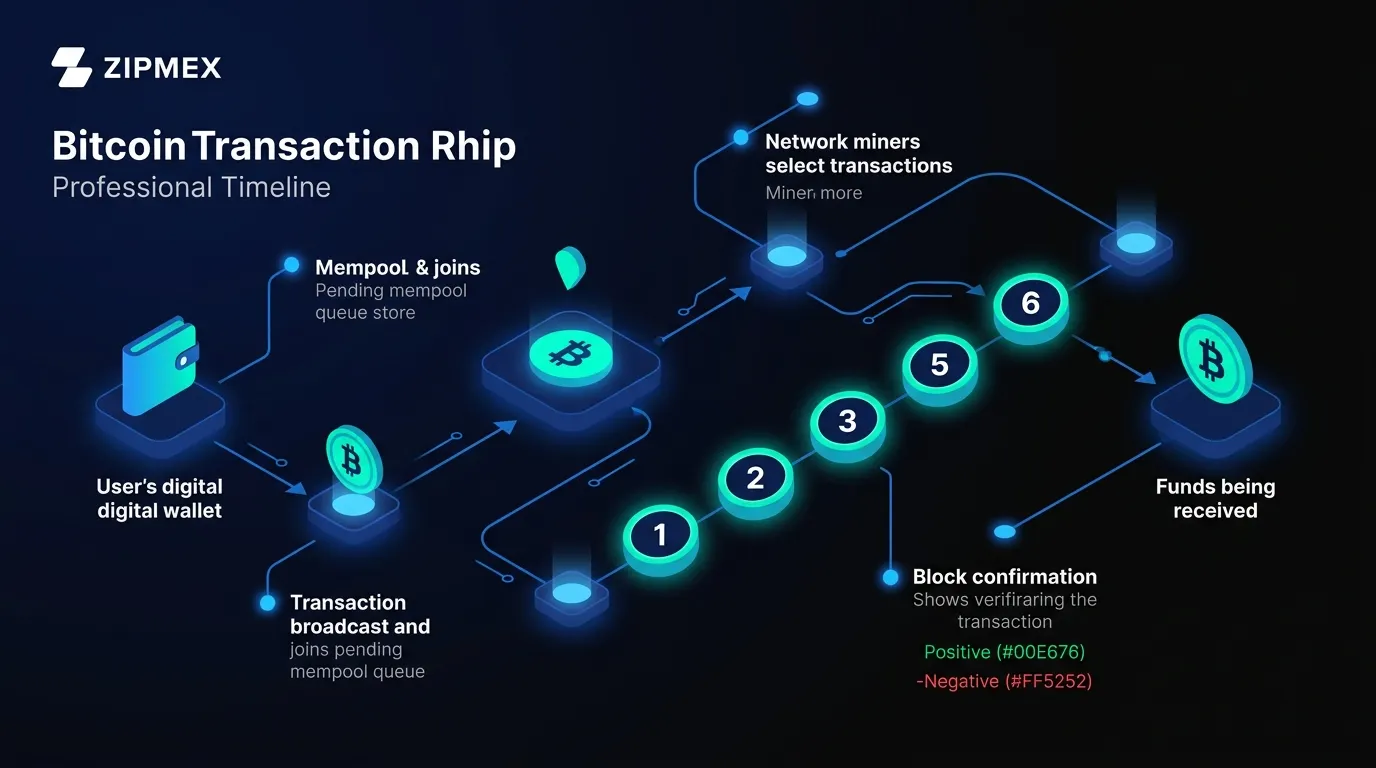
Before diving into timing, it helps to understand the mechanics. A Bitcoin transaction isn't a message between two bank accounts - it's a cryptographically signed data structure that reassigns ownership on a globally shared ledger. Here's the lifecycle of every transfer you make:
1. Construction and broadcast. Your wallet signs the transaction with your private key and broadcasts it to the Bitcoin peer-to-peer network. Nodes verify it's legitimate - correct signatures, no double-spend - and add it to the mempool (memory pool), a waiting room of unconfirmed transactions.
2. Miner selection. Miners assemble candidate blocks from mempool transactions. They prioritize by fee rate (satoshis per virtual byte, or sat/vB) - the higher you pay, the more likely miners pick your transaction for the next block.
3. Block inclusion and confirmations. Once a miner finds a valid block, every transaction inside gets its first confirmation. Each subsequent block adds another confirmation. According to D-Central Technologies, with the network running above 800 EH/s of total hashrate in 2026, even a single confirmation represents an extraordinary amount of computational energy securing your transaction.
Bitcoin Confirmation Time Table 2026
Data source: D-Central Technologies - Bitcoin Transaction Time Analysis, updated February 2026.
Most exchanges require between 3 and 6 confirmations before crediting your balance. For transactions below $1,000, a single confirmation is typically sufficient. For anything larger - or if you're sending to cold storage - waiting for 6 confirmations is the safer choice.
What Affects Bitcoin Transfer Time?
Bitcoin transfer times are not random. They are governed by four measurable, predictable variables. Understanding them gives you control over your own confirmation speed.
Transaction Fee (sat/vB) - The Most Important Factor
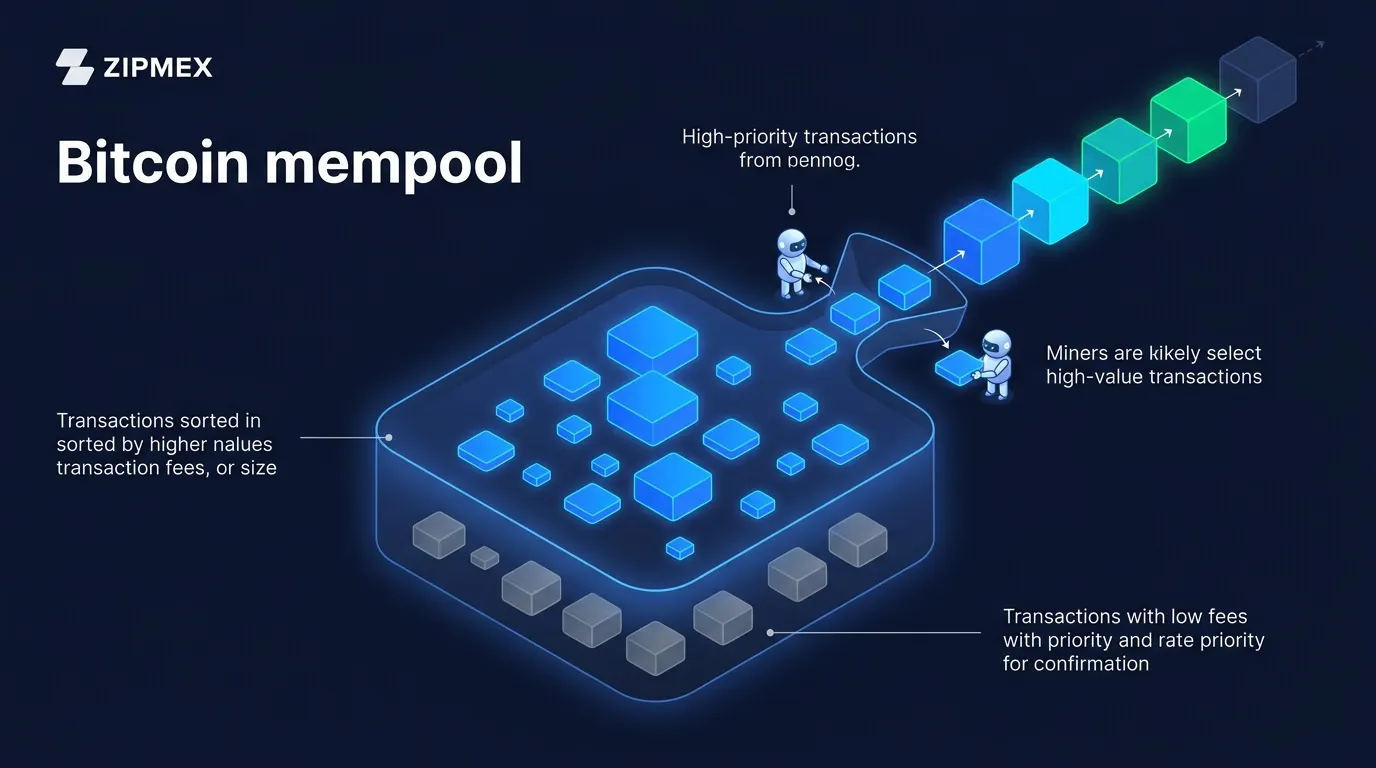
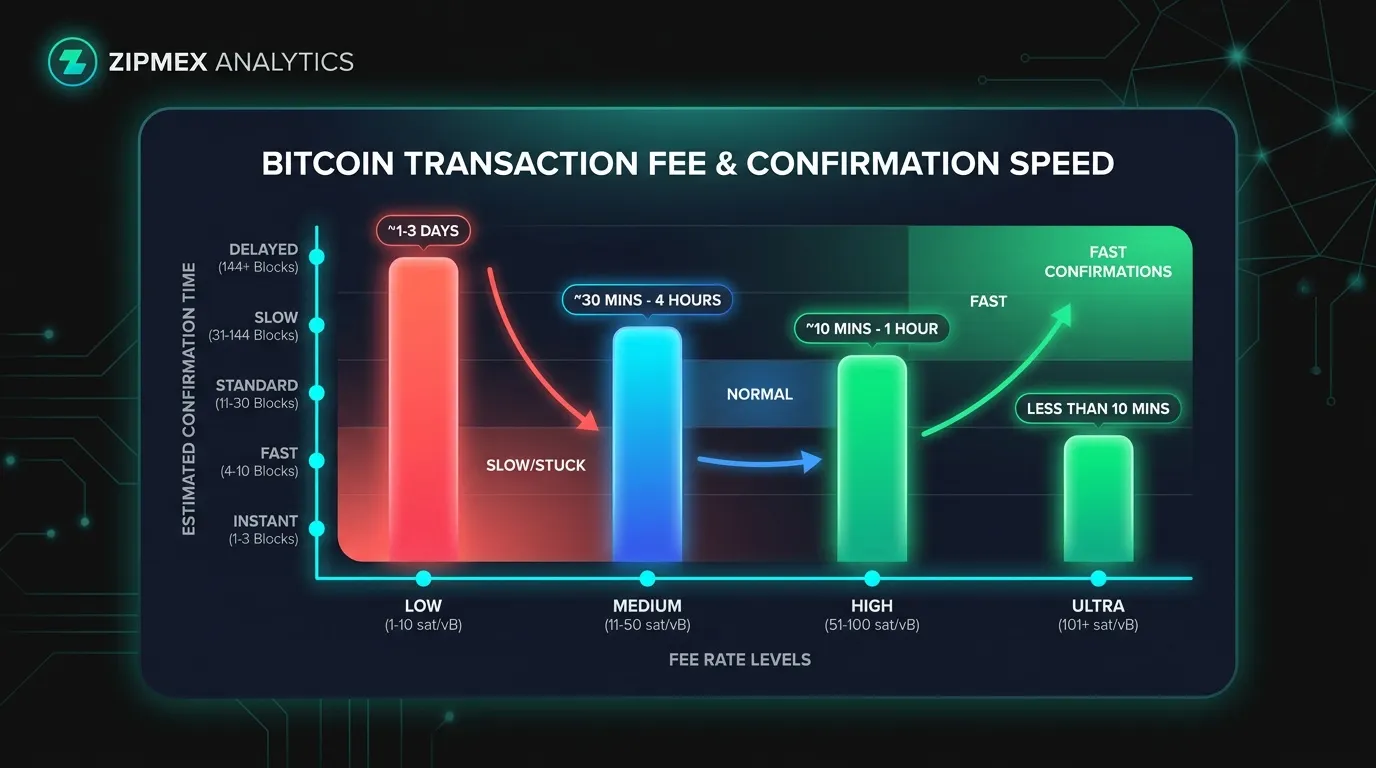
Miners are economically rational: they fill blocks with the highest-paying transactions first. Fees are measured in satoshis per virtual byte (sat/vB). As of April 2026, the BTC.network Block Space Report shows the median fee holding at 1 sat/vB - an extremely quiet fee environment where even minimum-fee transactions confirm without meaningful delay.
That said, conditions can change fast:
Network Congestion and the Mempool
Bitcoin's blockchain creates a new block approximately every 10 minutes. Each block holds a maximum of 4 million weight units - roughly 1,500 to 2,500 individual transactions per block. Compare this to Mastercard, which processes approximately 5,000 transactions per second - Bitcoin's base layer handles around 7 per second.
When demand exceeds supply - say, during a major market event, an Ordinals inscription wave, or a token launch - the mempool fills up. Low-fee transactions get pushed to the back of the queue and can wait hours or even days.
Historical context matters here: in December 2017, when Bitcoin hit $20,000, the mempool surged to 200,000+ unconfirmed transactions, fees spiked above $50 per transaction, and some users waited weeks. In April 2026, conditions are calm - but knowing this history helps you act fast when spikes return.
Transaction Size (vBytes)
Your fee is calculated as: Transaction Size (vB) . Fee Rate (sat/vB) = Total Fee (sats). A simple transaction with one input and two outputs is roughly 140-250 vB. A transaction consolidating 50 small UTXOs can be 7,000+ vB and cost 50x more in fees at the same rate - regardless of how much BTC you're sending.
🎯 Key Takeaways
- Fee ≠ percentage of amount sent. A $1M transaction can cost the same as a $10 transaction if both have similar byte sizes.
- SegWit and Taproot addresses save 30-50% on fees compared to legacy addresses - use bc1q or bc1p format wherever possible.
- Weekend mornings (UTC) typically have the quietest mempools and lowest fees.
The Receiving Platform's Requirements
Even if your transaction confirms in 10 minutes, you might still be waiting. Different platforms require different confirmation counts before crediting your account:
- Exchanges (Zipmex, Binance, etc.): typically 3-6 confirmations (30-60 min)
- Peer-to-peer payments: 1 confirmation often sufficient
- Cold storage / hardware wallets: 1-3 confirmations
- High-value OTC desks: up to 6 confirmations standard
Understanding the receiving platform's requirements helps set accurate expectations. If you're depositing to Zipmex, Bitcoin deposits become available for trading after 3 confirmations, which typically takes around 30 minutes under normal network conditions.
How to Speed Up a Bitcoin Transaction
If your Bitcoin transaction is confirmed, you're done. If it's stuck in the mempool, you have options.
Check mempool.space first
Go to mempool.space and enter your transaction ID. You'll see its position in the queue, current fee rate, and an estimated confirmation time based on live network conditions.
Use Replace-by-Fee (RBF)
If your wallet supports RBF and you enabled it before sending, you can broadcast the same transaction with a higher fee - effectively replacing the stuck version. Most modern wallets (Electrum, Sparrow, BlueWallet) support RBF. According to D-Central, this is your primary escape valve when the mempool surges unexpectedly after you've already sent.
Use Child-Pays-for-Parent (CPFP)
If RBF wasn't enabled, the recipient can create a new "child" transaction that spends the unconfirmed output and pays a high enough fee to incentivize miners to confirm both the parent and child together. This works if you're the recipient and your wallet supports CPFP (Electrum, Sparrow Wallet).
Wait it out
Most stuck transactions eventually confirm - mempool congestion typically clears overnight or over a weekend. According to NoOnes Blog, if you're not in a rush, patience costs nothing. Some wallets will automatically expire and drop transactions after 14 days if they never confirm.
⚠ Risk Warning
Bitcoin transactions are irreversible once confirmed. Always double-check the recipient address before sending. There is no "undo" button - even if confirmation takes hours, the destination address is locked in from the moment you broadcast. Be especially cautious of services promising "instant Bitcoin transfers" with unusually high fees - these are common scam vectors.
How to Prevent a Stuck Transaction (Before You Send)
Prevention is always better than the fix. Follow these steps before every transfer:
- Check mempool depth at mempool.space - if it's above 100 MB, consider waiting
- Use dynamic fee estimation - most wallets offer "high/medium/low" priority options
- Enable RBF by default in your wallet settings so you always have the option to bump fees later
- Use SegWit or Taproot addresses (bc1q or bc1p) to reduce transaction size and fees by 30-50%
- Avoid sending during peak hours - weekday afternoons (UTC) tend to have higher congestion than weekend mornings
Lightning Network: Instant Bitcoin Transfers
For users frustrated by 10-to-60-minute transfer times, there's a solution built directly on top of Bitcoin: the Lightning Network.
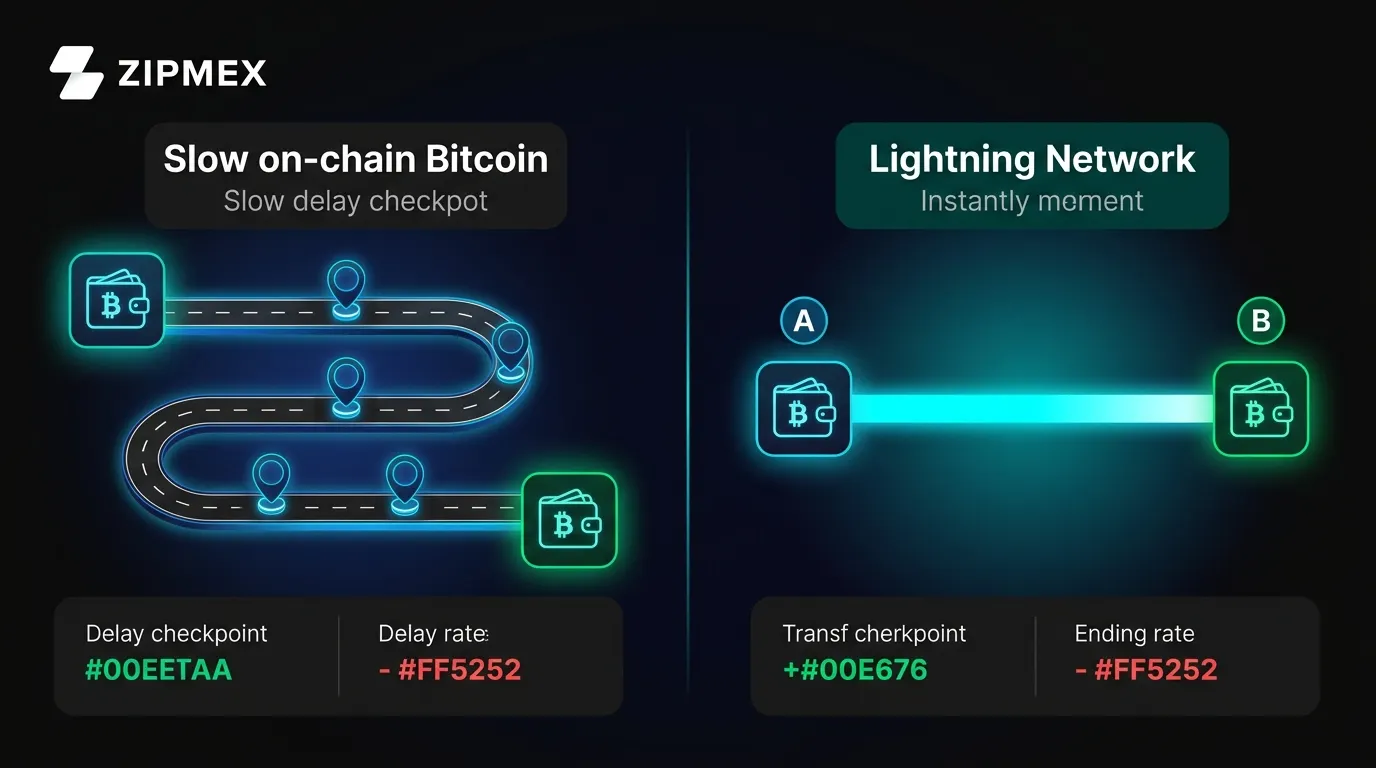
Lightning transactions occur in payment channels built on the Bitcoin base layer and settle in milliseconds with near-zero fees. According to D-Central Technologies, Lightning Network transactions settle faster than tapping a contactless card - under a second - while still using real Bitcoin.
The trade-off: both sender and receiver need Lightning-compatible wallets, and it's best suited to smaller, more frequent payments rather than large one-time transfers. For large-value movements or long-term storage transfers, on-chain Bitcoin is still the right tool.
Lightning is ideal for:
- Micropayments and tips
- Frequent small transfers between known parties
- Platforms and apps that support it natively (Strike, Wallet of Satoshi, Phoenix)
On-chain Bitcoin is better for:
- Exchange deposits and withdrawals
- Cold storage movements
- Any transfer over $1,000 where finality matters
For a deeper look at how to buy and send Bitcoin on-chain, see our guide on why people use Bitcoin and how to make money with Bitcoin.
How Long Does It Take to Transfer Bitcoin to an Exchange?
This is one of the most searched questions - and the answer depends on both the network and the exchange's policy.
When you send Bitcoin to an exchange like Zipmex, the process breaks into two stages: the on-chain confirmation time (10-60 minutes typically) and the exchange's own review of confirmations before crediting your account.
Here's what the process looks like in practice:
Stage 1 - Broadcast (seconds): Your wallet sends the signed transaction to the Bitcoin network.
Stage 2 - First confirmation (~10 minutes): A miner includes your transaction in a block. This is where the clock really starts.
Stage 3 - Exchange credit (after 3-6 confirmations, 30-60 minutes): The exchange sees the required confirmation count and credits your account balance. For Zipmex deposits specifically, Bitcoin becomes available after 3 network confirmations - typically around 30 minutes under normal conditions.
If your network is congested and you underpaid fees, your transaction may sit in the mempool for hours before the exchange even begins counting confirmations. This is why paying an appropriate fee is so critical for time-sensitive exchange deposits.
For context on Bitcoin's broader role in the market, our BTC Dominance guide and Bitcoin traceability explainer cover related topics in depth.
Frequently Asked Questions
How long does a Bitcoin transfer take?
Under normal network conditions in 2026, a Bitcoin transfer takes 10 minutes for the first confirmation and 30-60 minutes for 3-6 confirmations. Most exchanges require 3-6 confirmations before crediting your account. During periods of high congestion, transfers can take several hours or longer if your transaction fee is too low.
Can I speed up a Bitcoin transaction?
Yes. If you enabled Replace-by-Fee (RBF) before sending, you can rebroadcast the same transaction with a higher fee to push it up the priority queue. If you didn't enable RBF, the recipient can use Child-Pays-for-Parent (CPFP) to attach a high-fee child transaction that incentivizes miners to confirm both.
What is the Bitcoin mempool?
The mempool (memory pool) is a waiting room of unconfirmed Bitcoin transactions across the network. When you broadcast a transaction, it sits in the mempool until miners include it in a block. The deeper the mempool (measured in MB), the more competition there is for block space, and the higher fees need to be for timely confirmation.
Why is my Bitcoin transaction stuck?
The most common reason is an underpaid fee. Miners prioritize transactions by fee rate (sat/vB) - if you set your fee too low during a congested period, your transaction gets pushed to the back of the queue. Other causes include unusually high network activity (such as Ordinals inscription waves) or a sudden mempool surge after you sent.
How many Bitcoin confirmations do I need?
For small amounts under $1,000, one confirmation is generally sufficient. For medium-value transfers, 3 confirmations is the common standard. For high-value settlement or cold storage movements, 6 confirmations (approximately 60 minutes) is the industry standard. Some exchanges require up to 6 confirmations before crediting deposits.
Is Lightning Network faster than on-chain Bitcoin?
Yes - Lightning Network transactions settle in milliseconds with near-zero fees. However, both parties need Lightning-compatible wallets and sufficient channel liquidity. For large transfers, exchange deposits, or cold storage movements, on-chain Bitcoin remains the correct tool.
What does "unconfirmed Bitcoin transaction" mean?
An unconfirmed transaction has been broadcast to the network and is visible in the mempool, but hasn't yet been included in a block. It has 0 confirmations. It's not lost - it's waiting. Most unconfirmed transactions confirm within 1-3 blocks if the fee was set appropriately.
Conclusion: What to Expect When You Transfer Bitcoin in 2026
How long does it take to transfer Bitcoin? The answer depends entirely on two things you control: the fee you pay and the time you choose to send.
In April 2026, fees are at historic lows - the median is 1 sat/vB, meaning even minimum-fee transactions are confirming without delay. But this quiet environment won't last forever. The same network that confirms your transaction in 10 minutes today can back up for hours during a major market event.
The practical playbook is simple:
- Check mempool.space before any important transfer
- Use dynamic fee estimation (not the default "slow" setting)
- Enable RBF on every transaction you send
- Use SegWit or Taproot addresses to save on fees
- For exchange deposits, budget 30-60 minutes and you'll almost never be surprised
For more on how Bitcoin works and how to use it strategically, explore our guides on how Bitcoin can be traced on-chain, who created Bitcoin, and how to use on-chain analytics for trading.
⚠ Disclaimer: The information provided in this article is not intended to provide investment or financial advice. Investment decisions should be based on the individual's financial needs, objectives, and risk profile. We encourage readers to understand the assets and risks before making any investment entirely. Cryptocurrency investments are subject to high market risk. Past performance does not guarantee future results.
ZIPMEX promotes trading on trade.zipmex.com. Promotions are labelled and kept separate from news coverage, which is selected and checked without regard to them. Perpetual futures are leveraged derivatives. Prices can move fast and you can lose all of your margin. Not available in every jurisdiction. Not investment advice.